
An audio interface is a device that lets you connect instruments and microphones to your computer, converting the analog signal from those sources into a digital signal your computer can record, edit, or mix. Audio interfaces are commonly used alongside recording software like Pro Tools, Logic Pro X, Cubase, and Ableton Live.
This guide covers what an audio interface is, why you might need one, how it works, and how it differs from a sound card.
Quick verdict: if you’re recording vocals or instruments with an XLR microphone or instrument cable, you need an audio interface. If you’re using a USB microphone with a built-in converter, like many of the options in our best USB microphones under $100 guide, you likely don’t need one yet.
What Is an Audio Interface?
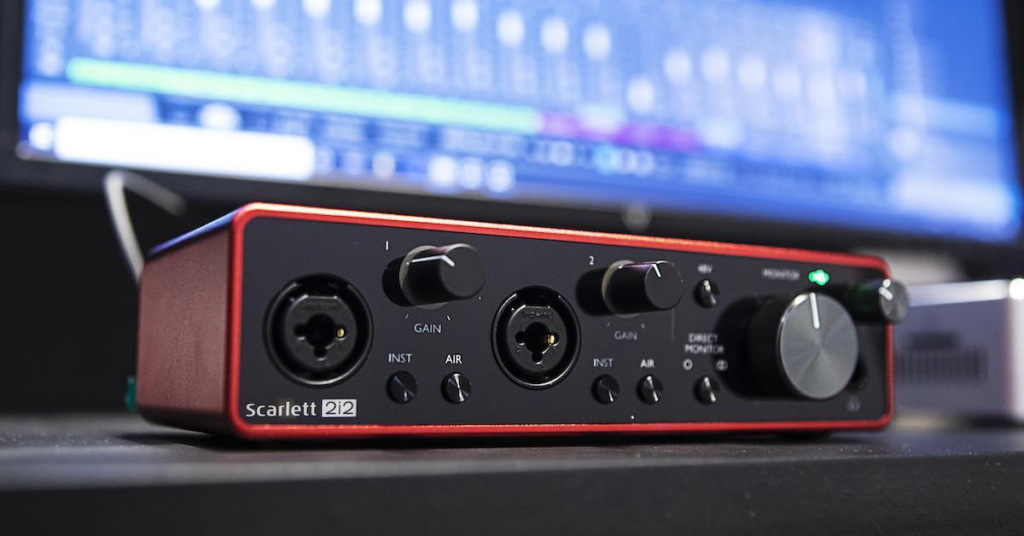
An audio interface converts an analog audio signal into a digital one. Computers only read digital signals, so this analog-to-digital conversion lets your computer process sound in ways it couldn’t handle on its own.
Because the conversion happens outside the computer, on the interface hardware itself rather than inside the machine, there’s less risk of conflicts with software or processes already running on your system.
An audio interface is the device that sits between your computer and your speakers or microphones, converting an audio signal into a digital one your computer can use. It lets you plug in headphones, microphones, or a MIDI keyboard, then converts those signals into data transmitted over a USB cable to your computer.
This means that when you’re recording audio from a microphone, what travels over USB isn’t just an electrical signal, it includes additional data that allows it to be converted into proper digital audio. This is what separates an audio interface from simply plugging a mic or instrument directly into a basic sound card input, and it’s a big part of why interfaces produce noticeably better analog-to-digital recordings.
In short, an audio interface translates what we hear as music into a digital language your computer understands, the binary 0s and 1s computers process natively, so that it can be played back, edited, or recorded as high-quality audio or MIDI.
Why Do You Need an Audio Interface?
An audio interface helps filter out unwanted noise from your speakers and microphones while also amplifying the signal coming from what you’re playing or singing into.
Audio interfaces make it possible to create a studio-like recording environment at home, something that would otherwise require a dedicated microphone and signal path for every instrument involved.
At its core, an audio interface acts as a buffer between your instruments and your speakers. It takes a signal from an external source, like a guitar or keyboard, and feeds it into something capable of reproducing that sound, whether that’s speakers or headphones. Some interfaces can also power certain connected devices, either through an electrical outlet or battery.
How much you need an audio interface depends largely on your workflow. If you’re performing entirely live, you may not need one right away. If you’re setting up multiple microphones or a more complex recording chain, an interface becomes much more useful.
You can also use an interface live alongside instrument or vocal audio if you’re applying effects through software or pedals. Many interfaces also supply phantom power, which lets electrical current flow to a device without requiring a separate wired power connection. This is essential for condenser microphones, which are commonly used in studio recording settings. If you’re working with a condenser mic specifically, our guide on what a condenser microphone is covers more on how phantom power fits into that setup.
Do You Need an Audio Interface for Music Production?
Yes, if you’re planning to record. Whatever you’re recording, whether vocals or instruments, needs to connect to your computer’s hardware in some form for the performance to actually be captured.
Is an Audio Interface the Same as a Sound Card?
Functionally, yes. What most people refer to as an audio interface is essentially what’s often called a sound card, and the two terms are frequently used interchangeably.
You’ll need one for almost any recording setup, even something as simple as recording your voice in Audacity. In practice, this means plugging headphones into your computer through a headphone or microphone jack, depending on what you’re recording, so that what’s playing or being recorded can actually be heard.
An audio interface is what you plug instruments or microphones into for recording, sending that signal directly into your computer. A sound card is what allows sound to play back through your speakers. In many modern setups, a single audio interface handles both directions of this process.
Best Audio Interfaces
If you’re shopping for an audio interface, look for one with enough input channels for your setup, phantom power support if you’re using a condenser microphone, and compatibility with your recording software of choice. Entry-level interfaces from brands like Focusrite and PreSonus are popular starting points for home studios, offering solid analog-to-digital conversion without a steep learning curve.
If you want to pair an interface with a strong XLR microphone, our guide to best microphones under $200 covers several options that work well in this kind of setup. If you’re deciding between mic types for that setup, our guide on what a dynamic microphone is is also worth a look.
Conclusion
An audio interface plays a central role in any home recording setup that goes beyond a basic USB microphone, converting analog signals from instruments and microphones into digital audio your computer can actually use. It also supplies phantom power for condenser microphones and helps reduce noise and signal conflicts compared to plugging directly into a computer’s built-in sound card.
If you’re building out a full recording setup, our guides on how to connect multiple microphones to a computer and how to record binaural audio cover related setup steps worth checking out next.