
Disclosure: GeekSper may earn a commission from qualifying Amazon purchases made through links in this article, at no extra cost to you.
The best microphone for Valorant and Dota 2 is the Shure MV7+ for players who want the clearest competitive voice chat and have room in their budget. Its dynamic cardioid design, close speaking position, USB processing, direct monitoring, and physical mute control make it easier to deliver short callouts without broadcasting every keyboard click. The FIFINE AmpliGame AM8 is the best value choice, while the Razer Seiren V3 Mini is the best compact option for a small desk.
This guide is specifically for ranked players, team captains, streamers, and Discord groups that care about intelligible comms. It is not another list based on RGB lighting or the highest sample rate. We compared current Amazon.com listings, official manufacturer specifications, pickup patterns, connection options, mute behavior, monitoring, desk requirements, software tools, and buyer feedback. Prices and rating counts were checked on July 13, 2026 and can change.
If you want a broader selection that also covers general streaming, read our best gaming microphones guide. Players with a strict budget should also compare our best gaming microphones under $100.
Quick comparison: best microphones for Valorant and Dota 2
| Microphone | Best for | Type and pattern | Connection | Amazon signal checked |
|---|---|---|---|---|
| Shure MV7+ | Best overall competitive comms | Dynamic, cardioid | USB-C and XLR | $299, 4.7/5 from about 992 ratings |
| FIFINE AmpliGame AM8 | Best value and noisy rooms | Dynamic, cardioid | USB and XLR | $44.99, 4.6/5 from 11,551 ratings |
| Razer Seiren V3 Mini | Small desks and simple mute | Condenser, supercardioid | USB | $39.99, 4.6/5 from 976 ratings |
| Elgato Wave:3 | Game, Discord and stream mixing | Condenser, cardioid | USB-C | $149.99 during research |
| HyperX QuadCast 2 S | RGB streaming battle stations | Condenser, four patterns | USB-C | $130.99 during research |
What matters for Valorant and Dota 2 voice chat?
Competitive communication has a different goal from studio recording. Your teammates need to understand a two-second callout immediately, even while weapon sounds, spell effects, fans, and mechanical switches are active. A warm broadcast tone is useful, but intelligibility and consistency matter more.
- Off-axis rejection: A focused cardioid or supercardioid pattern helps reduce sound from the sides and rear when the mic is aimed correctly.
- Close placement: Keeping the capsule about 2 to 6 inches from your mouth lets you use less gain, which reduces room and keyboard pickup.
- Fast mute access: A visible mute state prevents accidental hot-mic moments between rounds.
- Stable level: Teammates should not hear a whisper one round and clipping the next.
- Monitoring: A headphone output can help you notice breathing noise, desk vibration, or excessive gain before queuing.
- Desk fit: A microphone that blocks the minimap or forces poor posture is the wrong competitive tool, regardless of specifications.
Pickup pattern is only one part of the result. Our explanation of how microphones work covers why distance and direction change what the capsule captures.
1. Shure MV7+ – Best overall for competitive team chat
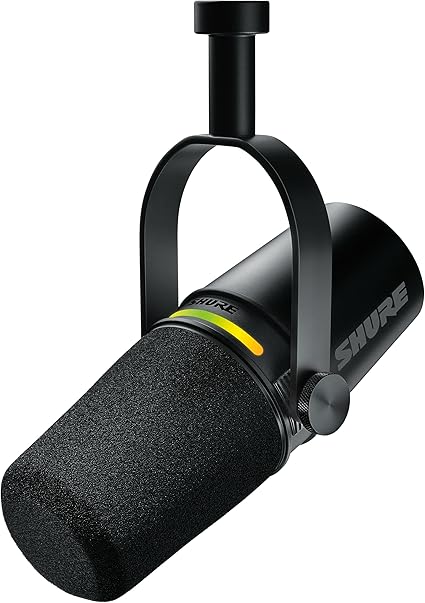

The Shure MV7+ is the most complete voice-focused option in this roundup. Its dynamic cardioid capsule is designed for close speech, a strong advantage when your keyboard sits directly below the microphone. Dynamic microphones are not silent to background noise, but they usually encourage a lower-gain, close-position workflow that is easier to control in an untreated gaming room.
USB-C mode provides Auto Level, a real-time denoiser, Digital Popper Stopper, tone controls, compression, and a high-pass filter through Shure’s software. Those tools can keep rapid Valorant callouts consistent when you lean back after a round or react loudly to a clutch. The 3.5 mm headphone output supports direct monitoring. XLR gives you a future path to an interface or mixer, although the USB processing does not affect the passive XLR output.
For Valorant, position the MV7+ slightly off the corner of your mouth so plosive air does not hit the capsule directly. For Dota 2, where voice chat can run longer during drafting and team fights, use a moderate auto-level target and avoid heavy compression that makes every breath equally loud.
Buy the Shure MV7+ if
- You want the strongest balance of clear speech, noise control, monitoring, and future flexibility.
- You play in an untreated bedroom or near a mechanical keyboard.
- You also stream, record guides, or plan to add an XLR interface later.
- You want software assistance without building a complicated audio chain.
Skip it if
- You only need casual party chat and cannot justify the price.
- You do not have space for a suitable stand or boom arm.
- You prefer an included desktop stand and a fully ready bundle.
Pros: Focused dynamic voice capture, USB-C and XLR, direct monitoring, auto-level processing, real-time denoiser, clear mute state, durable metal housing.
Cons: Highest price here, stand or arm is separate, must be placed close, USB processing is not sent through the passive XLR output.
2. FIFINE AmpliGame AM8 – Best value for Valorant and Dota 2

FIFINE AmpliGame AM8 USB/XLR Dynamic Gaming Microphone
The FIFINE AM8 brings the most useful competitive features into a much lower price range. It uses a dynamic cardioid capsule, supports both USB and XLR, and includes a headphone jack, gain control, monitoring control, mute, and optional RGB lighting. During our Amazon check it was $44.99 with a 4.6/5 rating from 11,551 customer ratings and more than 6,000 purchases in the previous month.
The AM8 is especially sensible for a player whose keyboard is louder than the room. Bring the end-address capsule close, point its rear toward the keyboard where practical, and lower input gain until normal speech remains clear. USB is the easiest starting point. XLR lets you add an interface later, but the USB-side controls do not operate the same way when you use the analog connection.
It does not have the Shure’s refined auto-level and denoising system, so placement matters more. That is a fair trade at this price. Good positioning with the AM8 can outperform an expensive condenser placed a foot away beside loud switches.
Buy the FIFINE AM8 if
- You want a competitive dynamic mic without paying premium prices.
- Your keyboard, PC fans, or room reflections are distracting.
- You value direct monitoring and a future XLR upgrade path.
- You want RGB that can be disabled when you prefer a clean setup.
Skip it if
- You want automatic level management and polished software processing.
- You plan to speak from far away instead of using close placement.
- You expect every USB control to remain active through XLR.
Pros: Excellent price, dynamic cardioid pickup, USB and XLR, headphone monitoring, useful physical controls, large Amazon feedback base.
Cons: Needs disciplined placement, less refined processing than premium models, XLR cable and boom arm may be separate purchases.
3. Razer Seiren V3 Mini – Best compact microphone for ranked play

The Razer Seiren V3 Mini fits players who want better callouts without turning the desk into a studio. Its 14 mm condenser capsule uses a supercardioid pattern, which is tighter than a typical cardioid pattern and helps focus on sound in front when aimed carefully. It records at up to 24-bit/96 kHz, includes tap-to-mute, and uses a built-in shock absorber to reduce some desk-borne vibration.
The compact body is helpful in Valorant because it can sit below the monitor without covering peripheral vision. In Dota 2, the tap mute is useful when switching between party discussion and outside conversation. The tradeoff is sensitivity. A condenser can sound crisp, but it will reveal a reflective room, loud fans, or an aggressive keyboard more readily than a close dynamic microphone.
Keep it closer than the product photos often suggest, aim the front toward your mouth, and keep the rear side oriented toward the most persistent noise. Do not raise Windows gain simply because the mic is physically small.
Buy the Razer Seiren V3 Mini if
- Your desk is small and you want an unobtrusive USB microphone.
- You value a tight supercardioid pattern and instant tap mute.
- Your room is reasonably quiet and your keyboard is controlled.
- You want plug-and-play capture without an interface.
Skip it if
- You play beside loud people, fans, or hard reflective walls.
- You need direct headphone monitoring, a hardware gain dial, or XLR.
- You want a microphone that is forgiving when placed far away.
Pros: Small footprint, focused supercardioid pattern, 24-bit/96 kHz, tap mute, integrated shock absorption, straightforward setup.
Cons: More sensitive to room and keyboard noise, no headphone jack, no XLR, limited onboard adjustment.
4. Elgato Wave:3 – Best for Discord, game and stream mixing

The Elgato Wave:3 is the best fit when the audio problem is not just the microphone. Its Wave Link software can organize microphone, game, Discord, music, browser, and capture sources into separate mixes. That is valuable for a Valorant or Dota 2 streamer who wants teammates to hear only the mic while viewers receive a balanced mix of comms and game sound.
The cardioid condenser captures a detailed voice, and Elgato’s Clipguard system provides extra protection when an excited reaction suddenly gets louder. A capacitive mute button avoids the hard mechanical click that can enter a recording. The headphone output supports monitoring, and the front dial manages useful levels without opening another window.
Wave Link is powerful, but software routing adds setup time and possible confusion. Confirm the correct microphone and virtual channels inside Windows, Discord, OBS, Valorant, and Dota 2 before a ranked session. Save a stable profile and avoid changing routing during a match.
Buy the Elgato Wave:3 if
- You stream and need separate game, Discord, music, and audience mixes.
- You want direct monitoring, Clipguard, and a silent capacitive mute.
- Your room is controlled enough for a cardioid condenser.
- You value software flexibility more than an XLR upgrade path.
Skip it if
- You want the lowest-maintenance microphone for voice chat only.
- Your keyboard or room is loud and the mic cannot sit close.
- You do not want to manage virtual audio routing.
Pros: Excellent stream-mixing software, useful Clipguard protection, headphone monitoring, capacitive mute, clean cardioid voice capture.
Cons: USB only, software has a learning curve, condenser sensitivity demands careful placement and gain.
5. HyperX QuadCast 2 S – Best RGB microphone for a gaming setup

The HyperX QuadCast 2 S is for players who want the microphone to be a visible part of the battle station. It combines extensive RGB lighting with four selectable pickup patterns, a detachable shock mount, desktop stand, USB-C cable, USB-A adapter, headphone monitoring, and a large top mute surface.
Use cardioid mode for Valorant and Dota 2. The other patterns are useful for interviews, group recording, or room capture, but they invite unnecessary sound into competitive voice chat. Position the front toward your mouth, keep gain lower than expected, and bring the mic closer. The included shock mount helps with vibration, although it cannot erase hard desk impacts or loud keyboard noise.
This is the largest visual setup in the group and the least subtle on camera. It makes sense for streamers who want a ready desktop bundle and prominent RGB. It makes less sense for a player who only wants clean comms at minimum cost.
Buy the HyperX QuadCast 2 S if
- You want a complete desktop bundle with shock mount and stand.
- RGB appearance is important to your camera framing or gaming setup.
- You will use cardioid for matches and other patterns for separate projects.
- You want headphone monitoring and an obvious mute indicator.
Skip it if
- You have a small desk or want the microphone out of sight.
- Your priority is maximum keyboard rejection for the money.
- You do not need multiple patterns or lighting.
Pros: Complete bundle, four patterns, direct monitoring, useful shock mount, easy mute, extensive RGB customization.
Cons: Large footprint, unnecessary patterns for solo gaming, condenser sensitivity, costs more than strong voice-chat-only options.
Best microphone settings for Valorant and Dota 2
1. Set placement before gain
Place a dynamic mic about 2 to 4 inches from your mouth and a condenser roughly 4 to 8 inches away as a starting point. Keep the mic slightly off-axis so breath does not hit the capsule directly. Move the microphone first, then adjust gain. If you begin with the mic a foot away, software noise suppression will be forced to repair a weak signal mixed with room noise.
2. Aim the rejection area toward noise
For a cardioid mic, the least sensitive area is generally behind the capsule. A supercardioid pattern has a small rear lobe, so angle matters more. Do a short recording while typing and rotate the microphone in small steps. Keep the orientation that makes speech clear while reducing switches and fans.
3. Prevent clipping before adding processing
Speak at your loudest realistic match volume and watch the input meter. Leave headroom so a clutch reaction does not turn into harsh distortion. Compression can control variation, but it cannot restore clipped audio. A limiter should be a final safety net, not permission to run excessive gain.
4. Use noise suppression lightly
Discord, graphics-card utilities, streaming software, and microphone apps may all offer suppression. Avoid stacking several aggressive systems. Too much processing can cut the first consonant from callouts such as “B main” or make hero names sound watery. Start with one modest suppression stage and test it with normal speech, whispers, and rapid calls.
5. Test the exact game path
A clean recording app does not prove that the game is using the same device. Select the microphone explicitly in Windows, Discord, Valorant, Dota 2, OBS, and any routing software. Disable unused webcam and controller microphones so a game update cannot choose the wrong input. Ask a teammate for a quick level check before ranked play.
Dynamic or condenser for competitive gaming?
A dynamic microphone such as the Shure MV7+ or FIFINE AM8 is the safer recommendation for most untreated gaming rooms. It rewards close placement and lower gain, which often reduces keyboard and room pickup. A condenser such as the Razer, Elgato, or HyperX can sound detailed and open in a quiet room, but it exposes placement mistakes more clearly. Read our guide to condenser microphones if you want a deeper explanation.
Neither type magically removes noise. Pattern, distance, room surfaces, gain, keyboard position, and software processing all contribute. A well-positioned $45 dynamic mic can be more useful for team chat than an expensive condenser placed beside the keyboard.
USB or XLR for Valorant and Dota 2?
USB is the right starting point for almost every player. It avoids an interface, extra cable, driver confusion, and additional gain staging. XLR becomes useful when you want a physical mixer, multiple microphones, hardware processing, or a studio upgrade. It does not automatically make team chat clearer. The Shure MV7+ and FIFINE AM8 let you start with USB and preserve that upgrade option.
Frequently asked questions
What is the best microphone for Valorant?
The Shure MV7+ is the best overall choice because its close dynamic cardioid design, USB processing, monitoring, and mute control suit short competitive callouts. The FIFINE AM8 is the stronger value choice under $100, and the Razer Seiren V3 Mini is better when desk space is extremely limited.
What is the best microphone for Dota 2?
The same three recommendations apply. Choose the Shure MV7+ for the most complete voice workflow, the FIFINE AM8 for value and keyboard control, or the Elgato Wave:3 when you also stream and need separate Discord, game, and audience mixes.
Can teammates hear a mechanical keyboard through these microphones?
They can if the microphone is far away, gain is high, or the keyboard sits in the most sensitive pickup area. A close dynamic mic generally makes control easier, but no microphone guarantees silence. Placement, input gain, a boom arm, desk isolation, and moderate suppression matter.
Should I use push-to-talk?
Push-to-talk is useful in shared or noisy rooms and can prevent open-mic distractions. Voice activation is faster during intense fights, but only when the threshold reliably opens for quiet speech and remains closed for keyboard noise. Test both with your real match volume.
Do I need a boom arm?
A boom arm is not mandatory, but it often provides the biggest practical improvement. It brings the microphone close without occupying mouse space, reduces the need for high gain, and can isolate some desk vibration. Confirm the arm can support the microphone’s weight and thread size.
Final recommendation
Buy the Shure MV7+ if competitive communication is a priority and you want a microphone that can also handle streaming, guides, and future XLR expansion. Choose the FIFINE AM8 for the best performance-to-price balance, especially near a mechanical keyboard. Choose the Razer Seiren V3 Mini for a small, clean desk. Streamers who need audio routing should choose the Elgato Wave:3, while the HyperX QuadCast 2 S is the strongest fit for an RGB-focused setup.
Whichever model you choose, spend the first ten minutes on placement and gain. For Valorant and Dota 2, a clear, consistent callout is worth more than any specification on the box.