

Disclosure: Geeksper may earn a commission from qualifying Amazon purchases made through links in this article, at no additional cost to you.
The best gaming microphones make your voice easy to understand without forcing teammates or viewers to listen to keyboard clatter, fan noise, clipping, or inconsistent volume. For most gamers, the Shure MV7+ is our best overall choice because its dynamic cardioid capsule, USB-C/XLR flexibility, auto-level processing, and real-time denoiser work especially well for voice chat and streaming. If you need a capable gaming microphone under $100, the FIFINE AmpliGame AM8 offers unusually strong value.
This guide compares five current Amazon.com options for Discord, competitive games such as Valorant and Dota 2, livestreaming, podcasting, and general PC gaming. If you are deciding between a standalone mic and a headset, our guide to the best microphones and headphones for online gaming explains the broader setup tradeoffs. Prices and Amazon rating counts were checked on July 13, 2026, but marketplace values can change.
Who this guide is for: PC gamers and streamers choosing a first standalone microphone or upgrading from a headset mic. The recommendations prioritize clear team communication, keyboard-noise control, simple setup, useful monitoring, and value at budgets from about $40 to $300.
Best Gaming Microphones Under $500: Quick Recommendations
| Microphone | Best for | Connection | Pickup pattern | Price checked |
|---|---|---|---|---|
| Shure MV7+ | Best overall | USB-C and XLR | Cardioid dynamic | $299 |
| HyperX QuadCast 2 S | RGB streaming setups | USB-C | Four selectable patterns | $130.99 |
| Elgato Wave:3 | Software-based stream mixing | USB-C | Cardioid condenser | $149.99 |
| Razer Seiren V3 Mini | Compact gaming mic under $100 | USB | Supercardioid condenser | $39.99 |
| FIFINE AmpliGame AM8 | Budget dynamic USB/XLR setup | USB and XLR | Cardioid dynamic | $44.99 |
Desk Space, Weight, and What Is Included
| Microphone | Confirmed physical details | Included or required | Desk-space advice |
|---|---|---|---|
| Shure MV7+ | 573.5 g, diecast aluminum housing, 5/8-inch mount | 3 m USB-C cable; stand or boom arm is separate | Plan for an arm or sturdy stand and close placement |
| HyperX QuadCast 2 S | 345 g microphone; 836 g complete setup with cable | Detachable shock mount, desktop stand, 3 m USB-C cable, USB-A adapter | Largest full desk setup here, but no immediate stand purchase |
| Elgato Wave:3 | 153 x 66 x 40 mm; 280 g with U-mount; 305 g base | Desktop base and 2.5 m USB cable; shock mount is optional | Moderate footprint; light weight can matter with some spring arms |
| Razer Seiren V3 Mini | 14 mm capsule, USB-C port, threaded mount; exact body dimensions and weight were not officially confirmed in the source reviewed | Compact desktop setup; no headphone jack or hardware gain dial | Best fit for very small desks |
| FIFINE AmpliGame AM8 | Dynamic end-address design and sturdy metal base; exact mic-only dimensions and weight were not officially confirmed | Standard base bundle includes USB cable; XLR cable and boom arm are separate | Base works initially, but an arm makes close positioning easier |
Official reference pages used for this setup check: Shure MV7+, HyperX QuadCast 2 S, Elgato Wave:3, Razer Seiren V3 Mini, and FIFINE AM8.
How We Chose These Gaming Microphones
We compared current manufacturer specifications, Amazon listing information, connection options, pickup patterns, controls, included accessories, and the volume and direction of buyer feedback. We then matched those facts to real gaming needs: rejecting a mechanical keyboard, keeping callouts intelligible, preventing clipping during excited reactions, monitoring voice without latency, and moving from a simple USB setup to an XLR interface later.
We did not treat a high sample rate or RGB lighting as proof of better voice quality. Microphone placement, room acoustics, pickup pattern, gain, and distance usually matter more. The ratings mentioned below are Amazon customer-rating signals observed during research, not Geeksper lab scores.
1. Shure MV7+ – Best Gaming Microphone Overall
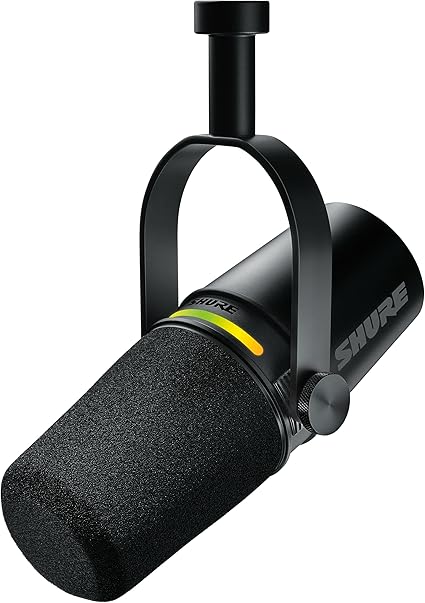

The Shure MV7+ is the strongest all-around recommendation for gamers who care about competitive voice chat today and may stream, record videos, or build an XLR setup later. Its dynamic cardioid design favors sound arriving from the front and is less eager than a sensitive condenser microphone to capture every click and room reflection.
USB-C operation unlocks the DSP tools documented in Shure’s official MV7+ user guide, including Auto Level Mode, a real-time denoiser, Digital Popper Stopper, tone controls, compression, and a high-pass filter. A 3.5 mm output provides direct headphone monitoring. The passive XLR output connects to an audio interface or mixer, although software processing does not affect that analog output.
- Key specifications: dynamic capsule, cardioid pattern, 50 Hz–16 kHz response, 24-bit/48 kHz USB recording, USB-C and XLR outputs, headphone monitoring.
- Amazon rating observed: 4.7/5 from approximately 992 ratings.
- Best used for: Valorant and Dota 2 comms, Discord, Twitch or YouTube streaming, voice-over, and untreated rooms.
Who should buy the Shure MV7+?
- Buy it if: you want the most complete voice-focused option for gaming, streaming, and a future XLR setup.
- Skip it if: you only need casual Discord chat or do not want to budget for a stand or boom arm.
- Choose it over the others because: it combines dynamic-mic room-noise control with USB processing, direct monitoring, and XLR flexibility.
What we like
- Focused, full voice sound with useful rejection of off-axis distractions.
- USB-C simplicity plus an XLR upgrade path.
- Auto-level, denoising, digital pop filtering, and direct monitoring.
- Durable metal construction and a clear touch-to-mute LED panel.
What to consider
- It is the most expensive microphone in this roundup.
- A desk stand or boom arm is normally a separate purchase.
- It performs best when positioned fairly close to your mouth.
2. HyperX QuadCast 2 S – Best RGB Gaming Microphone

The HyperX QuadCast 2 S is built for a gaming desk that appears on camera. More than 100 individually addressable LEDs create customizable lighting, while the capacitive top sensor provides a fast, visible mute action. Unlike a basic single-pattern mic, it offers cardioid, omnidirectional, bidirectional, and stereo modes.
Its USB audio system supports up to 32-bit/192 kHz recording. That specification offers generous technical headroom, but the practical advantages for gamers are the front multifunction control, headphone monitoring, removable shock mount, included desk stand, and straightforward USB-C connection. Use cardioid mode for solo gaming and keep the microphone close with gain set conservatively to reduce keyboard pickup.
- Key specifications: USB condenser microphone, four polar patterns, up to 32-bit/192 kHz, 3.5 mm monitoring, tap-to-mute, detachable shock mount, customizable aRGB.
- Amazon rating observed: 4.6/5 from approximately 643 ratings.
- Best used for: RGB gaming rooms, Twitch streams, multiplayer voice chat, interviews, and multi-person recording.
Who should buy the HyperX QuadCast 2 S?
- Buy it if: your microphone appears on camera and you want RGB, an included stand, and multiple pickup patterns.
- Skip it if: your mechanical keyboard or untreated room is loud and voice isolation matters more than lighting.
- Choose it over the others because: none of the other picks combines four patterns with this level of addressable RGB customization.
Pros
- Excellent visual fit for RGB and camera-facing setups.
- Four patterns make it more versatile than most gaming microphones.
- Convenient mute, gain, monitor-mix, and headphone controls.
- Shock mount and stand are included.
Cons
- A condenser capsule can capture more keyboard and room noise than a close dynamic mic.
- Full lighting and sound customization relies on HyperX NGENUITY.
- It is larger and visually louder than minimalist alternatives.
3. Elgato Wave:3 – Best Gaming Mic for Stream Mixing

The Elgato Wave:3 earns its place through workflow rather than flashy hardware. Wave Link software can combine microphone audio with game sound, Discord, music, browser audio, and alerts while creating separate mixes for you and your audience. That can replace a surprising amount of external streaming hardware.
The cardioid condenser capsule records at up to 24-bit/96 kHz, and Elgato’s Clipguard technology routes sudden peaks through a lower-volume signal path to reduce digital clipping. A capacitive mute surface and multifunction front dial keep essential adjustments within reach.
- Key specifications: cardioid condenser, 24-bit/96 kHz, USB-C, 3.5 mm headphone output, Clipguard, capacitive mute, Wave Link mixing software.
- Amazon rating observed: 4.7/5 from approximately 10,258 ratings.
- Best used for: single-PC streaming, OBS workflows, Discord and game-audio mixing, podcasting, and content creation.
Who should buy the Elgato Wave:3?
- Buy it if: you run a single-PC stream and want to route game, chat, music, browser, and alert audio in software.
- Skip it if: you want XLR connectivity or need maximum keyboard and room-noise rejection.
- Choose it over the others because: Wave Link and Clipguard solve streaming workflow problems that basic USB microphones do not.
Pros
- Wave Link is one of the most useful software mixers for streamers.
- Clipguard helps control sudden loud reactions.
- Clear controls and direct headphone monitoring.
- Large amount of long-term Amazon buyer feedback.
Cons
- Only one pickup pattern.
- No XLR output for a future analog setup.
- Careful placement is required around loud keyboards or reflective rooms.
4. Razer Seiren V3 Mini – Best Compact Gaming Microphone Under $100

The Razer Seiren V3 Mini is an easy upgrade over a thin laptop, webcam, or headset microphone. Its compact body takes little desk space, the supercardioid pattern narrows the listening area, and the top-mounted tap-to-mute sensor is useful when someone walks into the room mid-match. If you keep using a headset, our guide on how to use a headphone mic on PC covers setup and troubleshooting.
For competitive games, place it between 4 and 8 inches from your mouth and aim its least-sensitive area toward the keyboard. The built-in shock absorber helps with minor desk vibration, but a boom arm can improve placement further. It is a focused voice-chat microphone, not a full broadcast control center.
- Key specifications: USB condenser, supercardioid pickup, 20 Hz–20 kHz response, tap-to-mute with LED indicator, built-in shock absorption, compact desk stand.
- Amazon rating observed: 4.6/5 from approximately 976 ratings.
- Best used for: budget PC gaming, Valorant callouts, Discord, small desks, travel, and beginner streaming.
Who should buy the Razer Seiren V3 Mini?
- Buy it if: you want the lowest-cost, smallest plug-and-play upgrade from a headset or laptop microphone.
- Skip it if: you need direct headphone monitoring, a hardware gain dial, multiple patterns, or XLR.
- Choose it over the others because: it keeps setup and desk-space demands to a minimum while retaining tap-to-mute.
Pros
- Clear voice improvement at a low price.
- Compact and simple plug-and-play design.
- Supercardioid pattern helps focus on the speaker.
- Fast, visible tap-to-mute function.
Cons
- No headphone monitoring jack.
- No physical gain dial.
- Less control and upgrade flexibility than the MV7+ or AM8.
5. FIFINE AmpliGame AM8 – Best Budget Dynamic Gaming Microphone

FIFINE AmpliGame AM8 USB/XLR Dynamic Gaming Microphone
The FIFINE AM8 is the value pick for noisy gaming spaces. Its dynamic cardioid capsule is designed for close speech and is less sensitive to distant room sound than many inexpensive condenser mics. USB makes it beginner-friendly, while XLR lets you connect it to an interface or mixer later.
In USB mode, you get tap-to-mute, adjustable RGB, mic gain, a headphone jack, and monitoring volume. Those electronic controls and lighting are inactive over the passive XLR connection, so an interface must handle gain and monitoring in an XLR setup. An XLR cable and boom arm are not included.
- Key specifications: dynamic cardioid capsule, 50 Hz–16 kHz response, USB and XLR, headphone monitoring, RGB lighting, gain and monitor controls, included desktop stand.
- Amazon rating observed: 4.6/5 from approximately 11,551 ratings.
- Best used for: gaming microphone under $100, mechanical-keyboard setups, Discord, Valorant, Dota 2, podcasting, and entry-level XLR upgrades.
Who should buy the FIFINE AM8?
- Buy it if: you have a noisy gaming room, want to stay under $100, and value a future XLR upgrade path.
- Skip it if: you want a polished software ecosystem or expect RGB and onboard controls to work through XLR.
- Choose it over the others because: it offers the strongest combination of dynamic pickup, USB controls, monitoring, RGB, and XLR at the budget end.
Pros
- Dynamic capsule offers useful rejection in ordinary gaming rooms.
- USB convenience with an XLR upgrade path.
- Headphone monitoring, mute, gain control, RGB, and stand included.
- Very strong feature set for the price.
Cons
- RGB and onboard controls do not operate through XLR.
- No XLR cable or boom arm in the standard package.
- Build and software ecosystem feel less premium than Shure or Elgato.
Best Gaming Microphones for Valorant and Dota 2
Competitive games reward intelligibility, not cinematic richness. A short, clean callout must cut through game audio without transmitting every keyboard press. For that reason, we prefer a close-positioned dynamic cardioid model for Valorant or Dota 2.
- Best premium choice: Shure MV7+ for voice isolation, automatic level control, and flexible USB/XLR use.
- Best under $100: FIFINE AM8 for dynamic-mic rejection and useful USB controls.
- Best compact option: Razer Seiren V3 Mini when desk space matters most.
Whichever microphone you choose, keep it near your mouth, lower the gain, use push-to-talk or a sensible noise gate, and point the rejection area toward your keyboard. Those changes often improve comms more than buying a more expensive microphone and leaving it far away.
Best Gaming Microphones Under $100
The FIFINE AM8 is the better under-$100 choice for a noisy room, mechanical keyboard, or future XLR upgrade. The Razer Seiren V3 Mini is better when you want the smallest possible USB microphone with virtually no setup. Amazon prices fluctuate, so confirm the final price on the product page.
USB vs. XLR for Gaming
USB is the right choice for most gamers. It connects directly to a PC, requires less equipment, and can include software processing, mute controls, monitoring, and RGB. The MV7+, QuadCast 2 S, Wave:3, Seiren V3 Mini, and AM8 all support direct USB use. Our guide to how a microphone works explains how USB and analog signals reach your computer.
XLR makes sense when you want an audio interface, hardware mixer, multiple microphones, or a more modular studio. In this list, the Shure MV7+ and FIFINE AM8 offer both USB and XLR. Remember that an XLR setup adds the cost of an interface, cable, and sometimes a preamp or gain booster.
What to Look for in a Gaming Microphone
Pickup pattern
Cardioid and supercardioid patterns are normally best for a solo gamer because they focus on the voice in front. Omnidirectional and stereo modes are useful for group recording but can collect more room noise.
Dynamic or condenser
Dynamic microphones usually work best close to the mouth and tend to reject more distant noise. Condenser microphones can sound open and detailed, but they also reveal more keyboard noise, fans, and room reflections when gain or placement is poor. For a broader comparison, see our guide to microphone types, uses, and specifications.
Monitoring and controls
A headphone jack lets you hear your voice without distracting delay. A physical gain control and obvious mute indicator are especially valuable during live matches and streams.
Stand and positioning
A cheap boom arm can be a bigger upgrade than a small jump in microphone price. Bringing the mic closer allows lower gain, which reduces background sound and improves the ratio between your voice and the room.
Common Gaming Microphone Buying Mistakes
- Buying by sample rate alone: microphone placement, room noise, pickup pattern, and gain have a larger effect on voice-chat clarity.
- Choosing a sensitive condenser for a noisy desk: the detail can come with more keyboard, fan, and room sound.
- Forgetting the stand budget: the MV7+ needs a separate mounting solution, while the included stands on other models may still place the mic too far away.
- Assuming USB features work through XLR: the AM8 loses its RGB, mute, gain, and monitoring electronics when used through passive XLR.
- Placing the microphone beside the monitor: distance forces higher gain and usually captures more room noise. Position it 4 to 8 inches from your mouth when practical.
Frequently Asked Questions
What is the best gaming microphone overall?
The Shure MV7+ is our best overall pick because it combines a focused dynamic capsule, USB-C and XLR outputs, strong voice processing, direct monitoring, and reliable close-range speech capture.
What is the best gaming microphone under $100?
The FIFINE AmpliGame AM8 is our preferred gaming microphone under $100 for most rooms. Its dynamic cardioid capsule, USB/XLR connections, headphone monitoring, and onboard USB controls provide excellent value.
Which gaming microphone is best under $500?
The Shure MV7+ is our best gaming microphone under $500 because its dynamic cardioid design, USB-C and XLR connectivity, direct monitoring, and onboard voice processing suit both competitive gaming and streaming. Buyers who want to spend less should consider the FIFINE AM8.
Is a dynamic or condenser microphone better for gaming?
A dynamic cardioid microphone is usually the safer choice for a noisy room or mechanical keyboard because it is designed for close speech and tends to capture less distant sound. A condenser can provide more detail in a quiet room, but placement and gain need more care.
What pickup pattern is best for gaming?
Cardioid is the best default for one gamer because it prioritizes sound from the front. Supercardioid can narrow the pickup area further, while omnidirectional and stereo modes are better reserved for group or room recording.
Is a USB microphone good enough for gaming?
Yes. A good USB microphone is more than sufficient for Discord, competitive comms, streaming, and voice-over. XLR mainly adds modularity and hardware control rather than guaranteeing better results.
How do I stop my microphone from picking up keyboard noise?
Move the mic closer to your mouth, reduce input gain, aim the least-sensitive side toward the keyboard, use a boom arm or shock mount, and apply a light noise gate or denoiser. A dynamic cardioid microphone can also help.
Do I need a boom arm?
No, but a boom arm usually improves placement and frees desk space. It is particularly helpful for the MV7+ and AM8 because close positioning improves voice-to-background-noise performance.
Which microphone is best for an RGB gaming setup?
The HyperX QuadCast 2 S offers the strongest visual customization in this roundup, with more than 100 individually addressable LEDs and extensive color control through HyperX NGENUITY.
Final Recommendations by Buyer Type
- Best overall and best premium: Shure MV7+ for the strongest combination of voice isolation, processing, monitoring, and USB/XLR flexibility.
- Best budget pick: FIFINE AM8 for dynamic pickup, useful USB controls, and an XLR upgrade path under $100.
- Best for beginners and small desks: Razer Seiren V3 Mini for simple setup, low cost, and a compact footprint.
- Best gift choice: Razer Seiren V3 Mini because it is affordable, compact, and requires less setup knowledge than the premium options.
- Best for serious streamers: Elgato Wave:3 for Wave Link audio routing and Clipguard.
- Best RGB display choice: HyperX QuadCast 2 S for camera-facing setups, four pickup patterns, and extensive lighting control.
- Best for Valorant or Dota 2: Shure MV7+ at the premium end or FIFINE AM8 when value matters most.
If you want one recommendation without more comparison, buy the Shure MV7+ for the most complete long-term setup. Choose the FIFINE AM8 instead when staying under $100 is the priority.
For more microphone guidance, see our guide to the best microphones for vocals and recording.