

Corsair HS80 RGB Wireless is the best overall choice. It wins because Dolby Atmos support, broadcast-style boom microphone, and iCUE integration directly supports PC and PlayStation wireless gaming. HyperX Cloud II is the strongest alternative for buyers who prioritize multi-platform wired gaming.
As an Amazon Associate I earn from qualifying purchases. GeekSper did not personally test these products. Recommendations are based on confirmed product specifications, connection requirements, intended use, and practical tradeoffs.
How we chose
We evaluated platform compatibility, wired or wireless transport, boom-microphone operation, mute controls, software-dependent features, comfort implications, battery demands, and whether surround or processing features work on the target platform.
Quick comparison
| Product | Editorial position | Design | Connection | Best use | Primary limitation |
|---|---|---|---|---|---|
| Corsair HS80 RGB Wireless | Best overall | closed-back wireless gaming headset | wireless USB receiver | PC and PlayStation wireless gaming | Its software and spatial-audio features are not identical across all supported platforms. |
| HyperX Cloud II | Best for multi-platform wired gaming | closed-back wired gaming headset | 3.5 mm with USB control box | multi-platform wired gaming | Virtual surround depends on the USB control path and is not identical across every platform. |
| Logitech G432 | Best for PC gaming with flip-to-mute convenience | closed-back wired gaming headset | USB or 3.5 mm | PC gaming with flip-to-mute convenience | Software surround features are platform-dependent. |
| Razer BlackShark V2 X | Best for budget cross-platform gaming | closed-back wired gaming headset | 3.5 mm | budget cross-platform gaming | The analog connection is broadly useful, but PC surround features do not transfer to every console. |
| SteelSeries Arctis Nova 7X | Best for multi-platform wireless gaming | closed-back wireless gaming headset | 2.4 GHz wireless plus Bluetooth | multi-platform wireless gaming | Battery condition, software features, and wireless mixing vary by platform. |
| Logitech H390 | Best for computer calls and online classes | wired on-ear office headset | USB-A | computer calls and online classes | USB-A requires an adapter on computers that provide only USB-C. |
1. Corsair HS80 RGB Wireless – Best overall

Corsair HS80 RGB Wireless Multiplatform Gaming Headset – Dolby Atmos – Lightweight Comfort Design – Broadcast Quality Microphone – iCUE Compatible – PC, Mac, PS5, PS4 – Black

Why it earned this position: Corsair HS80 RGB Wireless combines Dolby Atmos support, broadcast-style boom microphone, and iCUE integration with a closed-back wireless gaming headset format. For this buyer, the practical advantage is PC and PlayStation wireless gaming.
What that means in use: Its wireless USB receiver connection determines which devices or supporting hardware are required. Its software and spatial-audio features are not identical across all supported platforms.
Closest comparison: Corsair HS80 RGB Wireless is the better choice for PC and PlayStation wireless gaming, while HyperX Cloud II is more appropriate for multi-platform wired gaming.
Pros
- Dolby Atmos support, broadcast-style boom microphone, and iCUE integration
- Well suited to PC and PlayStation wireless gaming
Cons
- Its software and spatial-audio features are not identical across all supported platforms.
- Requires battery management and platform checks
Buy it if: PC and PlayStation wireless gaming is the priority and the wireless USB receiver connection fits the setup. Skip it if: the stated limitation conflicts with the room, device, or workflow.
Verdict: Corsair HS80 RGB Wireless is a focused choice for PC and PlayStation wireless gaming, not a universal replacement for every alternative.
2. HyperX Cloud II – Best for multi-platform wired gaming
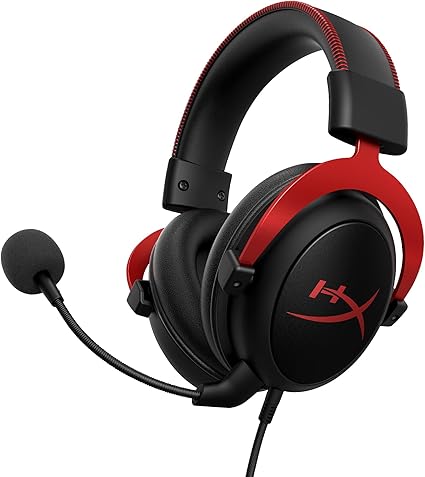
HyperX Cloud II Gaming Headset – 7.1 Surround Sound – Memory Foam Ear Pads – Durable Aluminum Frame – Multi Platform Headset – Works with PC, PS4, PS4 PRO, Xbox One, Xbox One S – Red (KHX-HSCP-RD) | Verified Features: Virtual 7.1 Surround Sound Via Included USB Advanced Audio Control Box, Durable Aluminum Frame, Ps5/ps4
Why it earned this position: HyperX Cloud II combines detachable microphone, memory-foam pads, aluminum frame, and virtual 7.1 through the USB box with a closed-back wired gaming headset format. For this buyer, the practical advantage is multi-platform wired gaming.
What that means in use: Its 3.5 mm with USB control box connection determines which devices or supporting hardware are required. Virtual surround depends on the USB control path and is not identical across every platform.
Closest comparison: HyperX Cloud II is the better choice for multi-platform wired gaming, while Logitech G432 is more appropriate for PC gaming with flip-to-mute convenience.
Pros
- Detachable microphone, memory-foam pads, aluminum frame, and virtual 7.1 through the USB box
- Well suited to multi-platform wired gaming
Cons
- Virtual surround depends on the USB control path and is not identical across every platform.
- The wired connection limits movement and must match the source
Buy it if: multi-platform wired gaming is the priority and the 3.5 mm with USB control box connection fits the setup. Skip it if: the stated limitation conflicts with the room, device, or workflow.
Verdict: HyperX Cloud II is a focused choice for multi-platform wired gaming, not a universal replacement for every alternative.
3. Logitech G432 – Best for PC gaming with flip-to-mute convenience

Logitech G432 Wired Gaming Headset, 7.1 Surround Sound, DTS Headphone:X 2.0, 50 mm Audio Drivers, USB and 3.5 mm Jack, Flip-to-Mute Mic, PC, Black
Why it earned this position: Logitech G432 combines 50 mm drivers, flip-to-mute microphone, and DTS Headphone:X 2.0 through supported software with a closed-back wired gaming headset format. For this buyer, the practical advantage is PC gaming with flip-to-mute convenience.
What that means in use: Its USB or 3.5 mm connection determines which devices or supporting hardware are required. Software surround features are platform-dependent.
Closest comparison: Logitech G432 is the better choice for PC gaming with flip-to-mute convenience, while Razer BlackShark V2 X is more appropriate for budget cross-platform gaming.
Pros
- 50 mm drivers, flip-to-mute microphone, and DTS Headphone:X 2.0 through supported software
- Well suited to PC gaming with flip-to-mute convenience
Cons
- Software surround features are platform-dependent.
- The wired connection limits movement and must match the source
Buy it if: PC gaming with flip-to-mute convenience is the priority and the USB or 3.5 mm connection fits the setup. Skip it if: the stated limitation conflicts with the room, device, or workflow.
Verdict: Logitech G432 is a focused choice for PC gaming with flip-to-mute convenience, not a universal replacement for every alternative.
4. Razer BlackShark V2 X – Best for budget cross-platform gaming

Razer BlackShark V2 X Gaming Headset: 7.1 Surround Sound – 50mm Drivers – Memory Foam Cushion – For PC, PS4, PS5, Switch – 3.5mm Audio Jack – Black
Why it earned this position: Razer BlackShark V2 X combines 50 mm drivers, memory-foam cushions, and PC 7.1 support with a closed-back wired gaming headset format. For this buyer, the practical advantage is budget cross-platform gaming.
What that means in use: Its 3.5 mm connection determines which devices or supporting hardware are required. The analog connection is broadly useful, but PC surround features do not transfer to every console.
Closest comparison: Razer BlackShark V2 X is the better choice for budget cross-platform gaming, while SteelSeries Arctis Nova 7X is more appropriate for multi-platform wireless gaming.
Pros
- 50 mm drivers, memory-foam cushions, and PC 7.1 support
- Well suited to budget cross-platform gaming
Cons
- The analog connection is broadly useful, but PC surround features do not transfer to every console.
- The wired connection limits movement and must match the source
Buy it if: budget cross-platform gaming is the priority and the 3.5 mm connection fits the setup. Skip it if: the stated limitation conflicts with the room, device, or workflow.
Verdict: Razer BlackShark V2 X is a focused choice for budget cross-platform gaming, not a universal replacement for every alternative.
5. SteelSeries Arctis Nova 7X – Best for multi-platform wireless gaming

SteelSeries Arctis Nova 7X Wireless Multi-Platform Gaming Headset – Neodymium Magnetic Drivers – 2.4GHz+Bluetooth – 38Hr USB-C Battery – AI Mic – Xbox Series X|S, PC, PS5, Switch, VR, Mobile – Black
Why it earned this position: SteelSeries Arctis Nova 7X combines simultaneous wireless options, USB-C charging, AI microphone processing, and quoted 38-hour battery life with a closed-back wireless gaming headset format. For this buyer, the practical advantage is multi-platform wireless gaming.
What that means in use: Its 2.4 GHz wireless plus Bluetooth connection determines which devices or supporting hardware are required. Battery condition, software features, and wireless mixing vary by platform.
Closest comparison: SteelSeries Arctis Nova 7X is the better choice for multi-platform wireless gaming, while Logitech H390 is more appropriate for computer calls and online classes.
Pros
- Simultaneous wireless options, USB-C charging, AI microphone processing, and quoted 38-hour battery life
- Well suited to multi-platform wireless gaming
Cons
- Battery condition, software features, and wireless mixing vary by platform.
- Requires battery management and platform checks
Buy it if: multi-platform wireless gaming is the priority and the 2.4 GHz wireless plus Bluetooth connection fits the setup. Skip it if: the stated limitation conflicts with the room, device, or workflow.
Verdict: SteelSeries Arctis Nova 7X is a focused choice for multi-platform wireless gaming, not a universal replacement for every alternative.
6. Logitech H390 – Best for computer calls and online classes

Logitech H390 Wired Headset for PC/Laptop, Stereo Headphones with Noise Cancelling Microphone, USB-A, in-Line Controls, Works with Chromebook – Black
Why it earned this position: Logitech H390 combines inline controls and a noise-reducing boom microphone with a wired on-ear office headset format. For this buyer, the practical advantage is computer calls and online classes.
What that means in use: Its USB-A connection determines which devices or supporting hardware are required. USB-A requires an adapter on computers that provide only USB-C.
Closest comparison: Logitech H390 is the better choice for computer calls and online classes, while Corsair HS80 RGB Wireless is more appropriate for PC and PlayStation wireless gaming.
Pros
- Inline controls and a noise-reducing boom microphone
- Well suited to computer calls and online classes
Cons
- USB-A requires an adapter on computers that provide only USB-C.
- The wired connection limits movement and must match the source
Buy it if: computer calls and online classes is the priority and the USB-A connection fits the setup. Skip it if: the stated limitation conflicts with the room, device, or workflow.
Verdict: Logitech H390 is a focused choice for computer calls and online classes, not a universal replacement for every alternative.
Buying guide
Check the platform before the surround claim
A 3.5 mm headset usually carries basic stereo audio and microphone signals across many platforms. Virtual surround, EQ, sidetone, and microphone processing may require USB, a receiver, or desktop software and can disappear on consoles.
Wired or wireless?
Wired headsets avoid charging and usually simplify latency. Wireless headsets improve movement but add battery wear, receiver compatibility, and possible interference. Bluetooth and 2.4 GHz wireless are different connections with different latency behavior.
Long sessions require more than soft pads
Weight distribution, clamp, earcup depth, heat, glasses pressure, and headband adjustment all matter. A lighter headset can still become uncomfortable if its pads press against the ears.
Frequently asked questions
Will a PC gaming headset work on a console?
Basic audio may work, but every feature may not. Check whether the console supports the headset connection, microphone path, receiver, and software-dependent controls.
Is 3.5 mm or USB better for a headset?
Neither is universally better. A 3.5 mm plug offers broad analog compatibility, while USB can enable processing, controls, and software features.
Does noise-cancelling microphone mean the headset has ANC?
No. Microphone noise reduction affects outgoing voice, while active noise cancellation affects what the listener hears.
Final verdict
Best overall: Corsair HS80 RGB Wireless for PC and PlayStation wireless gaming. Best alternative: HyperX Cloud II for multi-platform wired gaming. Buyers should avoid the top choice when its software and spatial-audio features are not identical across all supported platforms.